

New Software: Elevating Your Experience – Rivian Stories
Published
2025-12-18 15:04:37 UTC
Story by
Rivian
We’re wrapping up the year with a software update that elevates your overall driving experience, expands Rivian’s assisted driving capabilities and delivers on top requests from our customers.
Hands-free assisted driving in more places for Gen 2 vehicles
Since launching Enhanced Highway Assist earlier this year, our customers have asked us to expand this feature to more places. With 2025.46, we are rolling out Universal Hands-Free:* the expansion of hands-free assisted driving from 135,000 miles to more than 3.5 million miles of roads in the United States and Canada. Universal Hands-Free operates both on and off highways—if the lane lines are clearly marked, you can engage it.
Choose your drive style while Rivian Autonomy Platform features are engaged
A challenge our team is excited about is to emulate the best of human driving in our end-to-end AI models. Part of this work involves building the ability to give our customers choice in how driver assistance behavior while Universal Hands‑Free, Highway Assist, Adaptive Cruise Control, and Lane Change on Command are engaged.
That’s why in 2025.46 we’re also rolling out Autonomy Drive Styles,** which enables you to select “Mild,” “Medium,” and “Spicy” presets to guide how your vehicle operates on the road.
- Mild: a relaxed style with more gap distance and more gradual lane changes.
- Medium: a balanced style to manage cut-ins and accelerate with traffic flow.
- Spicy: a more dynamic style with a tighter gap distance and quicker steering during lane changes.

An improved Autonomy View and easier speed adjustment
Rivian’s multi-modal sensors give your Gen 2 vehicle 360-degree awareness of the surrounding environment, and this also powers the autonomy visualizations that are rendered to the Driver Display. With this update, the Autonomy View now zooms out to show more of the area behind your vehicle, so you have more context for maneuvers such as lane changes and turns.
Finally, we made an adjustment to a small detail that makes controlling your speed easier while Universal Hands-Free, Highway Assist, or Adaptive Cruise Control is engaged. We’ve added the ability to roll the right thumbwheel up or down on the steering wheel to increase or decrease your set speed.
Rivian Digital Key
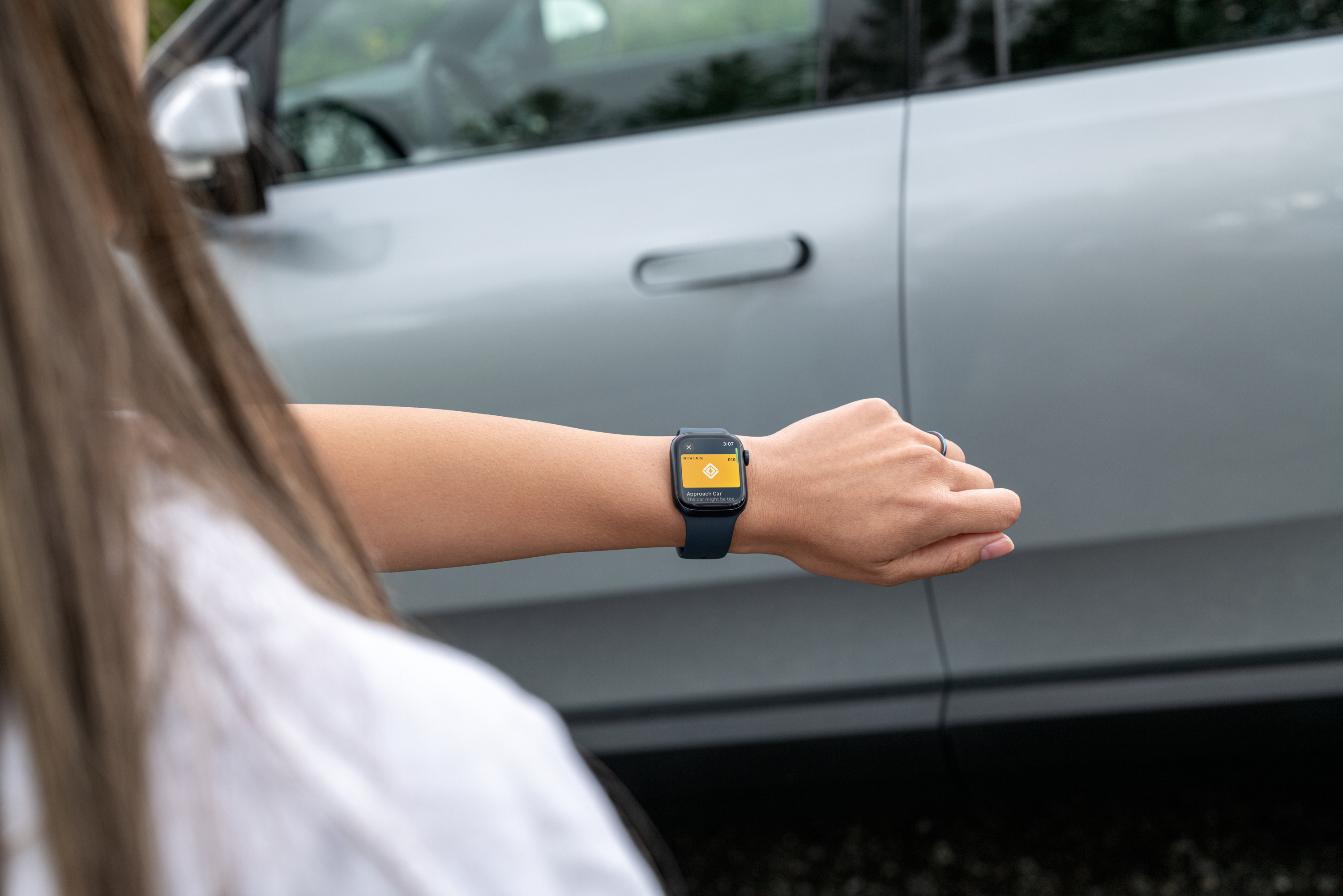
Starting today, we’re rolling out Rivian Digital Key, which enables you to add your Gen 2 car key to your digital wallet on iPhone and Apple Watch, Google Pixel and Samsung devices to seamlessly access and drive your vehicle, as well as share keys with family and friends. This new feature requires Rivian app version 3.8.0 or higher.
Rivian digital key is built using the Car Connectivity Consortium (CCC) standard, enabling compatibility with new and emerging devices and ensuring that the way you access your vehicle is supported by the latest technology in vehicle access. It’s also Rivian’s next-generation key, which will be built into our future vehicle models like R2 and R3.
Once a digital key has been added to your wallet app, it can be used to seamlessly lock or unlock your vehicle with passive entry. Plus, you can access your vehicle using a compatible smartwatch, allowing you to leave your phone at home. On both iPhone and Apple Watch, haptics will indicate with a “tap” feeling when your vehicle locks or unlocks.
Read more here about the benefits of Rivian Digital Key, and visit our support pages to learn more about which devices are supported and instructions.
Choose your Driver Display view

We’re adding the ability for Gen 1 and 2 drivers to customize which view they see at-a-glance on their Driver Display while driving. Gen 2 drivers can now switch between the Autonomy view, which shows surrounding lanes and vehicles, and the Maps and Navigation view on the driver display. Gen 1 drivers can switch between the Driver Assistance view, which shows vehicles and objects up ahead, and the Maps and Navigation view on the driver display. Press the right thumbwheel on the steering wheel to swap.
This helps you get more out of the two displays in your vehicle—for example, change the music while stopped without losing front and center navigation instructions.
Enhancements for Gen 2 Quad-Motor
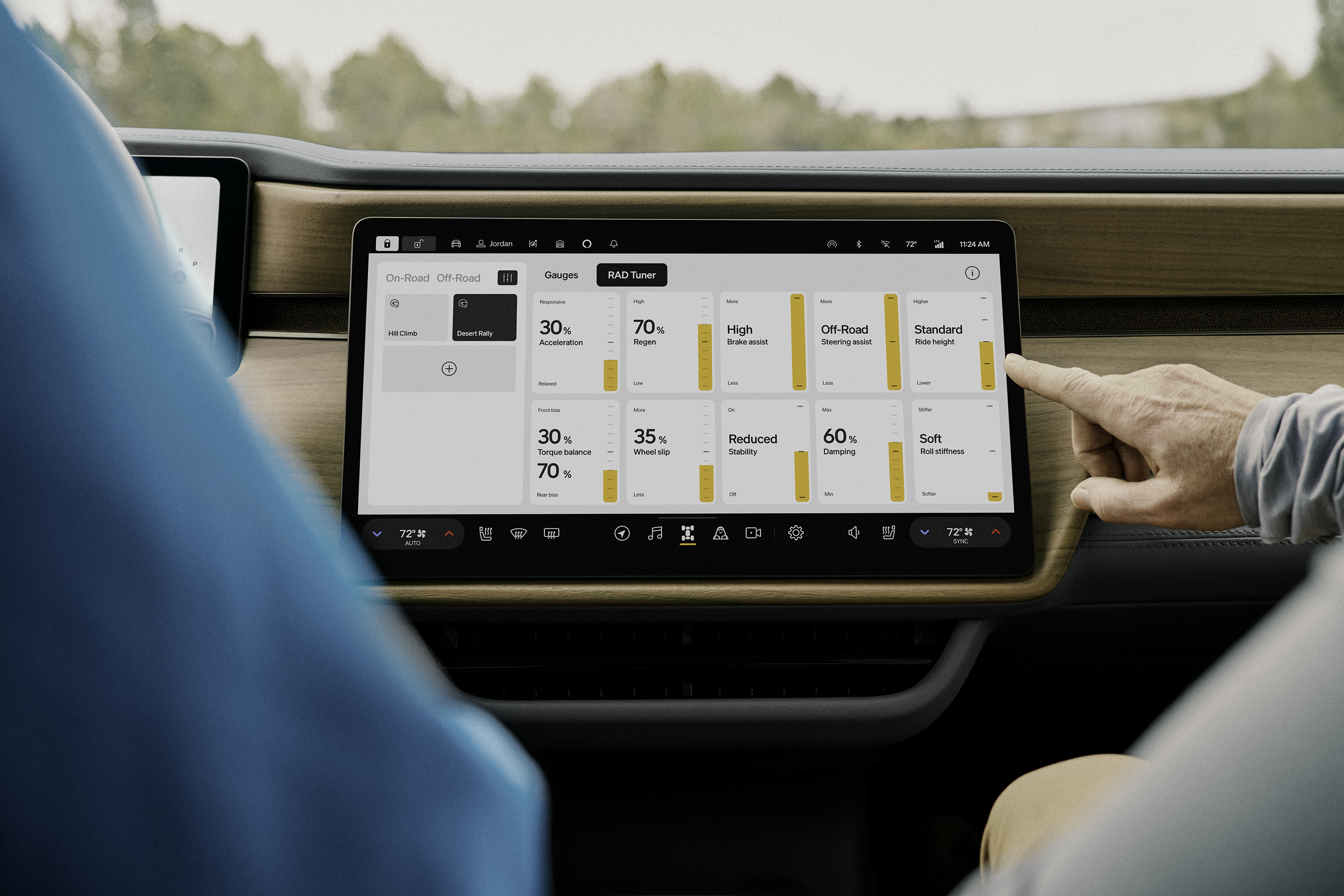
Kick Turn and RAD Tuner are rolling out exclusively to Gen 2 Quad-Motor vehicles, giving you a boost to your vehicle’s off-road agility and unparalleled control over driving dynamics.
- Kick Turn: Say goodbye to tricky turns on dirt and gravel. Kick Turn makes it easier to steer in tight off-road conditions while moving at speeds under 15 mph (24 km/h). It works by controlling the power and tire grip, letting the vehicle spin about its center, even when it’s moving. You can now make tighter turns with just a simple button press. When you engage Kick Turn, your R1 Quad smartly adjusts the power to the inside wheels, slowing them down or even reversing them. This precise control over wheel slip ensures your vehicle turns exactly as quickly and smoothly as you intend.
- RAD Tuner: This feature is brought to you by the Rivian Adventure Department (RAD), a team of engineers, software developers and designers who create and test features that push the boundaries of our vehicles. RAD Tuner was first used by the teams behind our historic wins at Rebelle Rally and Pikes Peak International Hill Climb. Go beyond the factory presets and optimize your Quad-Motor’s dynamic behavior for your preferences and the terrain. Use intuitive touch sliders to build and save custom drive modes by adjusting independent settings like acceleration, torque balance, stability and more.
When you choose a Rivian, you’re choosing a vehicle that’s built for adventure—now and in the future. We are dedicated to building best-in-class software that continues to improve your experience over time, whether you’re taking the wheel or getting assistance from your vehicle’s advancing capabilities.
Watch the presentation from Rivian’s first Autonomy & AI Day to learn more about the future we’re driving toward.
To view the full release notes for 2025.46, click on the links below.
visit rivian.com
*Universal Hands-Free will not stop or slow down for traffic lights or stop signs. Review the Rivian Owner’s Guide for additional details about this feature.
**Carefully review the Owner’s Guide to understand each Drive Styles setting (mild, medium and spicy) and how it impacts vehicle acceleration, braking and lane change behavior.
© 2025 Rivian


